Free · runs on your own server · public beta
Courier sends an everyday notice to the school’s Windows computers, to the ones you choose or to the people you name, and shows you which screens displayed it and who pressed OK.
For everyday notices, not emergencies. Needs a Windows Server that stays on. Try it on a few computers first.
See it
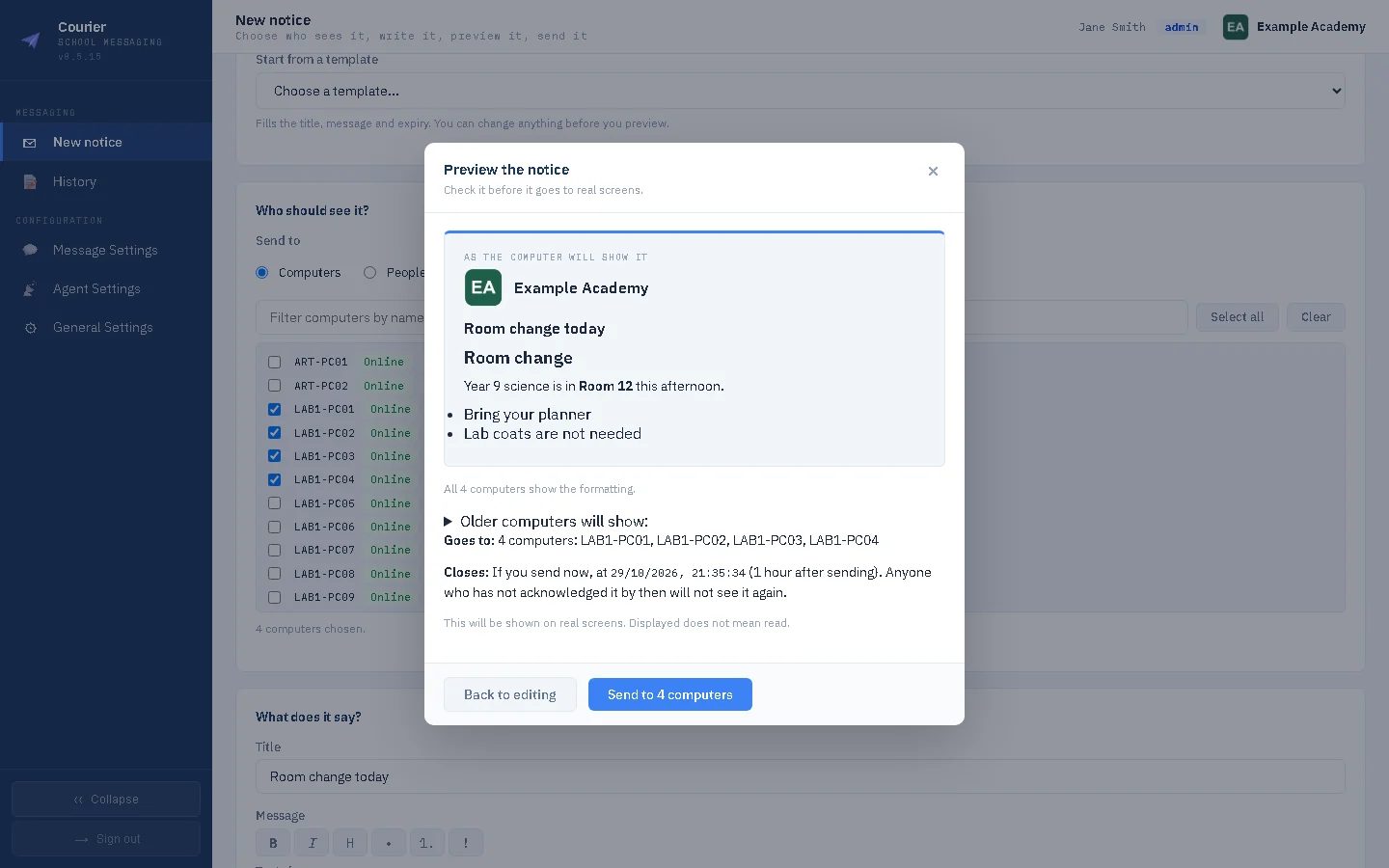
Real pages from a real installation, filled with an invented school’s data. Every screen below is the product as it ships, not a mock-up. The window a notice appears in on a computer is not shown here: the preview is Courier’s own picture of it.
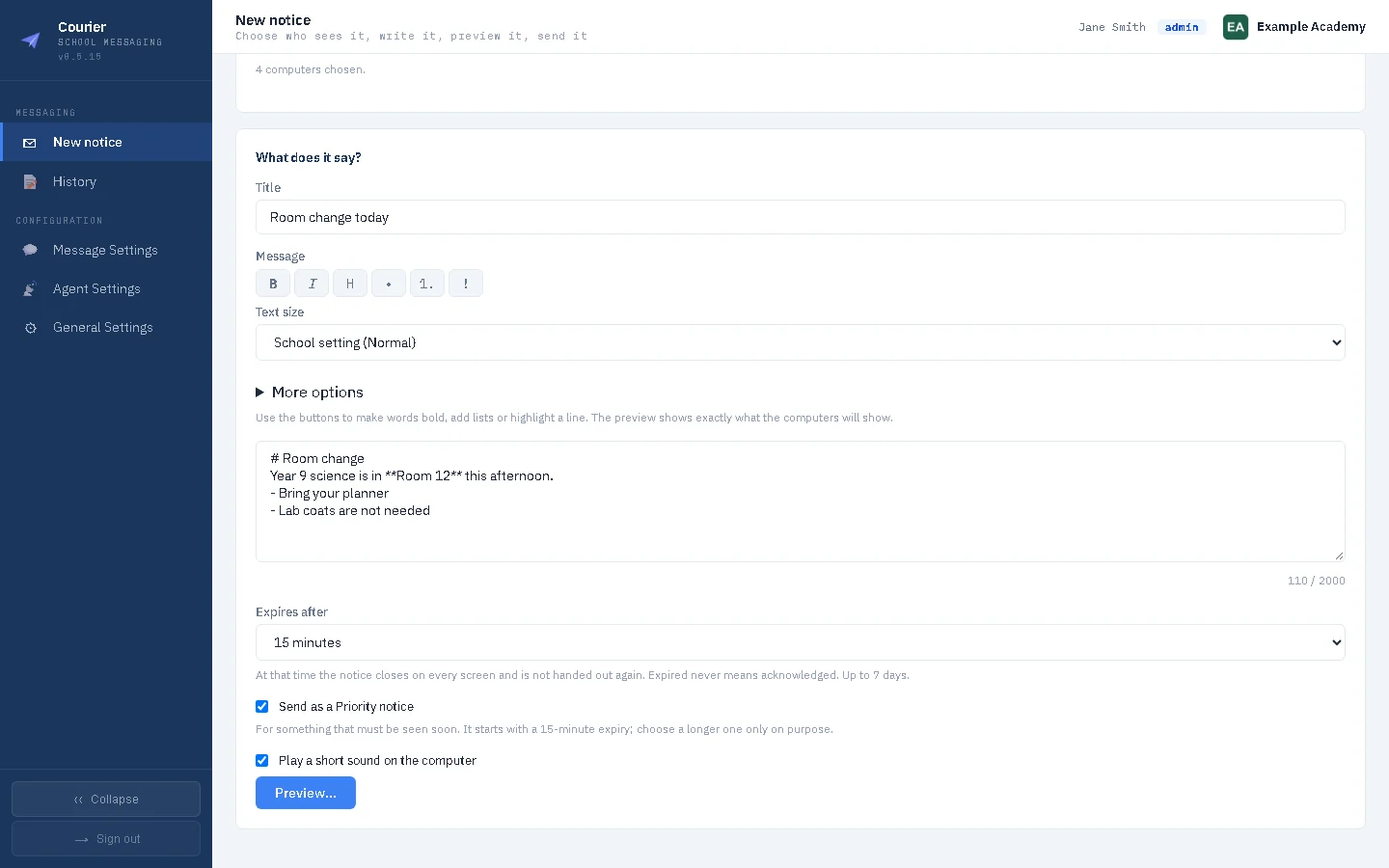
Write a notice, choose the computers (or the people), and say how long it lasts. Computers without the Courier module are marked.
What it is not
A room change, a system going down for maintenance, a reminder about the fire drill: that is what Courier is for.
It is not an emergency or lockdown alerting system. It gives no promise that a notice arrives in time, and it must not replace your fire alarm, your lockdown procedure or anything else a life depends on.
What it does
Write a notice, choose computers or people, and see what they will see before you send. The preview warns you about computers that are off, computers without Courier turned on, and people who are not signed in anywhere.
For every recipient: waiting, received, displayed, acknowledged, expired or failed. “Displayed” means it was on the screen, never that anyone read it, and “expired” is never counted as acknowledged. Download any notice’s results as a spreadsheet.
Choose 15 minutes, an hour (the usual), four hours, the end of the day, a day, or your own time up to seven days. When the time is up, the notice stops being delivered.
Save the notices you send again and again as templates, with blanks for a date, a room or a choice. Your school’s name and logo appear in the console and in the preview.
Address a notice to the Active Directory groups you already keep, such as a year group. Find a group by name and count who is in it. Nested groups are followed, the list is fixed at the moment you send, and you can limit it to your school’s own OUs when you share a domain with other schools. Courier only reads the directory.
Every notice and its results are kept for as long as the school chooses: a year unless you say otherwise.
Local accounts on your own server, as administrator or sender. A sender sends only to the audiences an administrator gives them, and an administrator can limit how much each sender sends.
No licence key, no paid edition and no cap on computers. Every school, every screen.
Self-hosted, like Groundskeeper. Your notices, accounts and results stay on a server you run.
How it works
1
It runs as a Windows service on a server inside the school network. You make the first administrator account in your browser, on that server.
2
Courier runs on the RSJ Agent, the same small agent Groundskeeper and Caretaker use. Point each computer’s agent at your Courier server, then turn Courier on for the ones you choose. They fetch what they need from your server.
3
Write the notice, choose computers or people, and choose how long it lasts. The preview shows the notice, who it reaches and what might go wrong. Nothing is sent until you press Send.
4
The notice appears in a window on each signed-in computer with an OK button. Pressing OK closes it and tells you it was acknowledged. The results page updates while you watch.
Already run Groundskeeper or Caretaker? Your computers have the agent already. Courier works on its own too: it needs the agent, not either of them.
The agent
Courier does not install a program of its own on the school’s computers. It runs as a small module on the RSJ Agent, the same agent that Groundskeeper and Caretaker use. A computer that already has the agent only needs Courier switched on; a computer that does not have it gets it from your Courier server.
The console does the rest: a deploy script for one computer or a Group Policy startup script for many, a list of every enrolled computer and who is signed in, a search of Active Directory for computers that have no agent yet, and a switch to turn Courier on or off for the ones you choose. Courier’s module only shows notices. It does not monitor or change anything else on the computer.
Where it stands
Courier is a free public beta, for everyday notices and not for emergencies. It has been tried in a small lab: notices sent to lab computers, shown on screen and acknowledged, including on a locked screen and after signing back in. There is more testing to do, and the beta schools’ first weeks will show what is missing.
Pricing
There is one Courier, and it is free.
Support is through GitHub Discussions and Issues, answered by the person who wrote the software. There is no helpdesk with opening hours, and no one to do the install for you: Courier is built to be installed and run by the school’s own IT.
Your data
Courier runs on a server you own. The notices you write, the accounts, the recipients and the results are kept there, and the computers talk to that server across your own network.
This version has no usage reporting. You decide how long history is kept. Courier installs a newer version only when an administrator presses Update now, or has switched automatic updates on; it runs only an installer signed by RSJ Software Ltd.
Community
Courier is a beta, so what schools find matters more than anything on this page. Ask a question, suggest something, or report a problem.
Ask how something works, or suggest what Courier should do next, in RSJ Software’s shared Discussions. Other schools can see the answer.
Something not working? Open an Issue, and attach the support bundle from General Settings, Logs: it is made on your own server and you read it before you send it.
Or write to hello@rsjsoftware.com.
FAQ
Yes. It is free for any number of computers, with no licence key and no paid edition.
No. Courier is for everyday notices and gives no guarantee that a message arrives in time. Keep your fire alarm and lockdown procedures exactly as they are.
Yes. Courier is its own product and does not need Groundskeeper or Caretaker. It does need the RSJ Agent on the computers it reaches. If you already run either product, the agent is already there.
A notice window with the title and message and an OK button. Pressing OK closes it and records that it was acknowledged. A notice addressed to people shows only to that person, on a computer where they are signed in. A notice addressed to computers shows to whoever is using that computer.
The notice waits for the computer until it expires. After that it is not delivered, and the results say expired, never acknowledged. We have built this but not yet tested it on a lab computer that was switched off.
On your own server, inside your network. Notices, accounts and results do not go to RSJ Software or to the cloud.
Administrators can send to any computers or people. A sender can send only to the audiences an administrator gives them, and an administrator can limit how much each sender sends.
Yes, as a free beta. Download CourierSetup.exe from the Releases page and run it on a Windows Server that stays on. It is free, with no licence key and no limit on the number of computers. It has only been tried in a small lab so far, so start with a few computers and tell us how it goes. It is not for emergencies.
No separate download. The Courier installer carries the RSJ Agent installer, and the console offers it so you can put the agent on your computers from the server you have just set up. If your computers already run Groundskeeper or Caretaker, the agent is already there. Courier adds a small module to it and changes nothing else the agent does.
Courier runs on a Windows Server on your own network, with the RSJ Agent in the installer. Download the free beta, or read the docs first.
Questions or problems: hello@rsjsoftware.com
